
Canary
Your PC is fine.
Are you sure?
Free Windows diagnostics that reads what your hardware actually reports, and tells you plainly what it means.
Why it exists
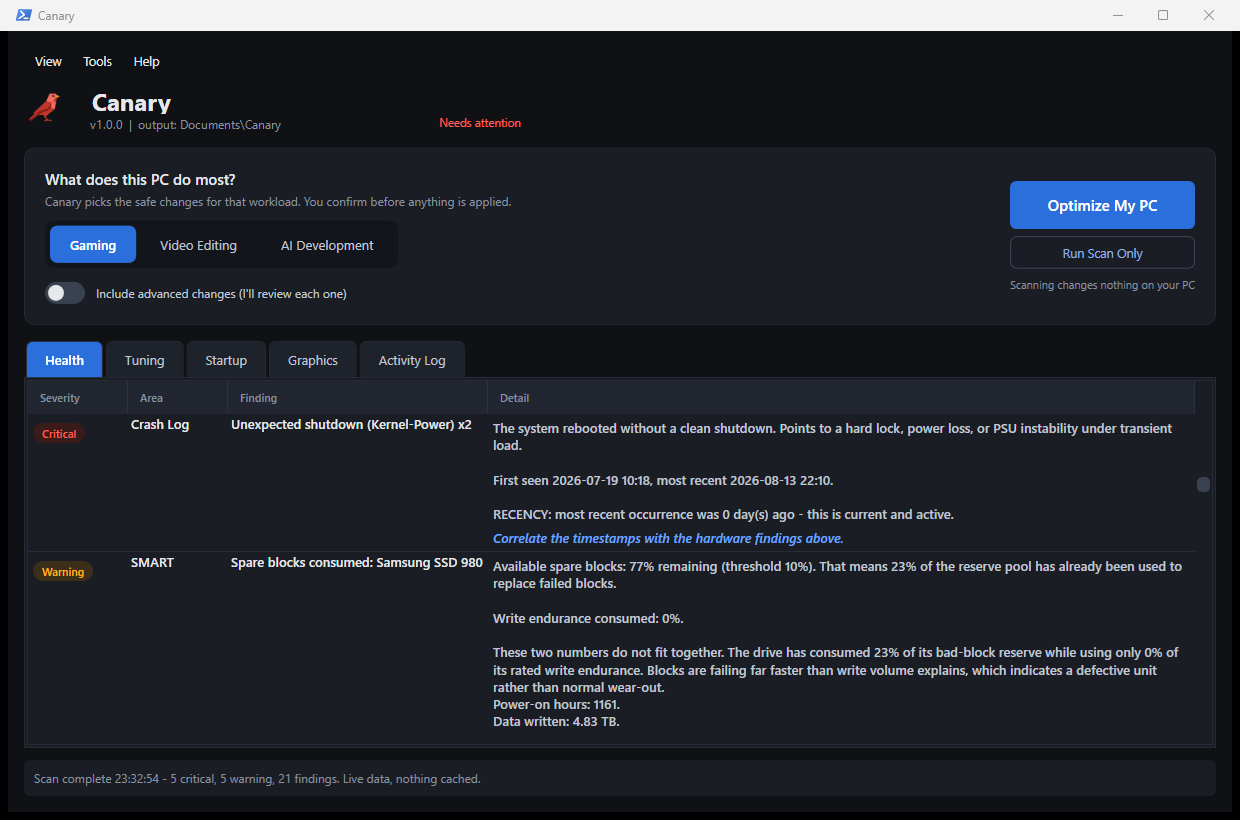
Samsung’s own tool called this drive Good.
0
unrecoverable read errors
Data the drive could no longer hand back. Not slow. Gone.
0%
of its spare blocks used up
At zero percent wear. The drive wasn’t worn out. It was breaking.
Vendor tools report a pass/fail flag. Canary reads the counters underneath it, and tells you what they mean.
What it looks at.
Failing drives
Reads the counters inside the drive itself, not the pass/fail badge a vendor tool shows you.
Silent crashes
Finds the freezes Windows records but never puts in Event Viewer. Most tools never look here.
Why it boots slowly
Every startup program, in plain words, with what actually happens if you turn it off.
Signs of compromise
The specific ways malware stays on a PC: hijacked sign-ins, disabled antivirus, hidden tasks.
Your attack surface
What an attacker on your network could reach: exposed Remote Desktop, SMBv1, open ports.
Files quietly in the cloud
Whether your Desktop and Documents actually live on this PC, or in OneDrive without you asking.
Four things it refuses to do.
Every one of these is standard in paid “PC optimizers”. All four are placebo at best.
Clean your registry
Unused keys cost nothing. Deleting a live one breaks something weeks later.
“Free up” your RAM
Windows caches on purpose. Emptying it makes the next few minutes slower.
Disable services in bulk
The ones that matter break in ways you will never trace back.
Promise “30% faster”
A number with no method behind it is marketing. Be sceptical of any tool that shows one.
If you think you’ve been hacked
Before you wipe the whole machine.
Reinstalling Windows costs you a day. Not reinstalling, when something really is on there, costs more. Canary looks for the specific ways malware stays on a PC, so the decision is based on something.
And the honest limit
It can raise suspicion. It cannot prove a PC is clean. Anything running at kernel level hides from it.
So findings mean something. An absence of findings does not. If you have real reason to think you were hacked, reinstall, and this scan should not talk you out of it.
Find out what your PC isn’t telling you.
Takes about a minute. Nothing is installed, and nothing keeps running afterwards.
Free · no account · alpha
Found a bug, or something it got wrong? Tell me on Discord, especially if it warned about something you know is fine.